
How to Print Adhesive Labels in 2026?
Print Adhesive Labels remain a practical bridge between packaging design, product information, and brand recognition. They must stick cleanly, scan reliably, and survive transport, moisture, refrigeration, or shelf handling. A label can look attractive on screen, yet fail on a dusty carton. That gap matters.
Industry data shows continued demand. Smithers’ The Future of Global Printing to 2028 identifies packaging and label printing as resilient growth areas, supported by shorter production runs and product personalization. Grand View Research estimates that the global pressure-sensitive labels market will expand steadily through 2030, with food, beverages, logistics, and healthcare among important users. Figures differ between reports because analysts define “labels” differently. That is worth remembering.
Mike Fairley, a respected label-industry analyst and editor, has described labels as “the silent salesperson.” The phrase is simple. It explains the commercial pressure behind every roll. A printed adhesive label must communicate quickly, often within seconds, while meeting material, ink, adhesive, and finishing requirements. Digital printing can support variable data and smaller batches. Flexographic printing may remain efficient for longer runs. Neither method is automatically best.
This guide explains how to Print Adhesive Labels in 2026, from artwork preparation and adhesive selection to printer settings, curing, inspection, and waste reduction. It also considers recyclable face stocks, liner choices, and responsible sourcing. Some recommendations will need testing. Real production is rarely perfect. A sample label may pass visual inspection but peel after cold storage. Careful trials still beat confident assumptions.
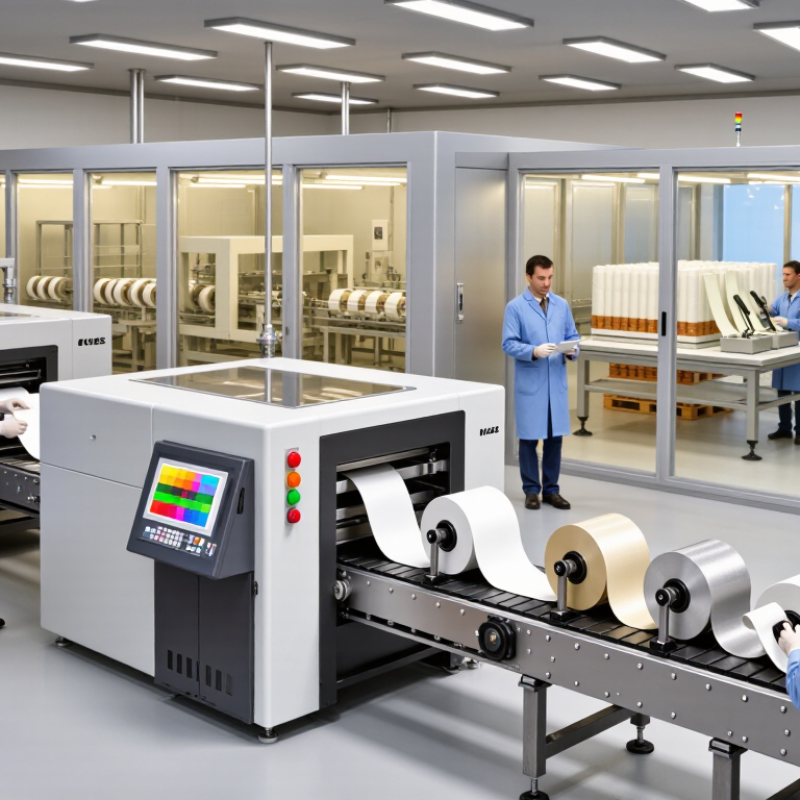
What Are Adhesive Labels and How Do They Work?
Adhesive labels are printed materials that stick to surfaces without extra glue. They usually contain three layers: a face material, pressure-sensitive adhesive, and release liner. The face material carries text, images, barcodes, or symbols. The adhesive bonds when pressure activates it. Heat is usually unnecessary.
In 2026, printing adhesive labels is easier with digital equipment and accurate design software. Choose the label material for the surface first. Paper suits dry indoor packaging, while synthetic materials handle moisture better. Before printing, check the printer settings, label size, ink compatibility, and barcode clarity. A clean, dry surface improves adhesion. Dust can cause lifting. So can curved edges.
Tips: Store label sheets flat and away from humidity. Print a small test batch before full production. Press each label from the center outward to reduce bubbles. Leave enough space between labels for clean cutting. I still inspect the first sheet by hand, because screen previews can hide tiny alignment errors. Perfect results are not guaranteed. A slightly shifted label may reveal a template problem, not a printer failure. That detail deserves attention.
| Data Dimension | Label Type or Process | Typical Specifications or Data | How It Works | Printing and Application Considerations |
|---|---|---|---|---|
| Adhesive Label Construction | ||||
| Label facestock | Paper | Common basis weights: approximately 60–100 g/m² | Provides the printable surface and carries text, graphics, barcodes, or variable data. | Suitable for many indoor uses; uncoated paper absorbs ink, while coated paper generally produces sharper graphics. |
| Label facestock | Polyester film | Common thickness range: approximately 25–75 micrometres | Creates a durable, flexible surface that resists moisture and tearing better than ordinary paper. | Requires inks or toner designed to bond to synthetic films; useful for outdoor, industrial, and chemical-container labels. |
| Label facestock | Polypropylene film | Common thickness range: approximately 40–100 micrometres | Forms a lightweight plastic label with good moisture resistance and flexibility. | Check printer compatibility and drying or curing requirements before using solvent-resistant or water-resistant applications. |
| Adhesive layer | Permanent pressure-sensitive adhesive | Designed for long-term bonding after pressure is applied | The adhesive forms contact with the substrate without requiring heat, water, or a separate solvent during application. | Best for labels that should remain attached; surface cleanliness and application pressure strongly affect bond strength. |
| Adhesive layer | Removable pressure-sensitive adhesive | Designed for clean or low-residue removal under specified conditions | The adhesive holds the label during use but is formulated to allow removal more easily than permanent adhesive. | Removal performance depends on dwell time, temperature, surface energy, and the condition of the substrate. |
| Adhesive layer | Repositionable adhesive | Allows limited adjustment shortly after application | The adhesive initially provides lower adhesion, allowing the label to be aligned before the bond develops. | Useful for alignment-sensitive applications; repeated repositioning can reduce final adhesion. |
| Release liner | Silicone-coated paper or film | Usually supplied as a removable backing sheet | The release coating allows the adhesive label to separate from the liner before application. | Keep liners dry and flat to reduce curling, feeding problems, and misalignment during printing. |
| Printing Method Selection | ||||
| Printing method | Desktop inkjet | Best suited to short runs and full-colour variable content | Liquid ink droplets are deposited onto the label surface to create text, images, and colour gradients. | Use inkjet-compatible label stock; allow sufficient drying time and select coated or ink-receptive material for cleaner output. |
| Printing method | Desktop laser or LED | Best suited to short and medium runs with sharp text and graphics | Electrostatically formed image areas attract toner, which is then fused to the label surface using heat and pressure. | Use stock rated for the printer's fuser temperature; avoid materials that can soften, warp, or release adhesive in the printer. |
| Printing method | Direct thermal | Thermal-sensitive label stock; no ribbon required | A heated printhead activates heat-sensitive areas of the label to form the image. | Simple and economical for short-life uses, but many direct thermal materials can darken with heat, sunlight, or prolonged storage. |
| Printing method | Thermal transfer | Uses a coated ribbon and a compatible label face | Heat transfers ink from a ribbon onto the label surface, creating a durable printed image. | Often selected for long-lasting text, barcodes, and variable data; ribbon and facestock must be matched for the required durability. |
| Printing method | Flexographic printing | Efficient for high-volume repeat production | Flexible relief plates transfer ink to the label material, generally using one plate for each printing colour. | Requires plate preparation and setup, so it is less flexible for frequent design changes or very short runs. |
| Printing method | Digital production printing | Suitable for variable data, multiple designs, and medium-to-long runs | Digital imaging creates each label directly from electronic artwork without traditional printing plates. | Supports fast artwork changes and versioning; material, ink, toner, and finishing compatibility should be tested before production. |
| Key Print and Performance Data | ||||
| Barcode resolution | Linear and two-dimensional barcodes | Use a print system capable of producing clean, high-contrast edges; 300 dpi is commonly used for detailed label work | Scanner reliability depends on the contrast, module size, quiet zone, print sharpness, and absence of distortion. | Print a verification sample and test it with the intended scanning equipment. Avoid placing barcodes across seams, curves, or wrinkles. |
| Colour mode | Full-colour artwork | RGB is commonly used for screen design; CMYK is commonly used for process-colour production | Colour is converted by the printer or workflow into the inks or toners available in the selected printing process. | Colours can vary with substrate, ink, coating, lighting, and printer profile. Proof the final material rather than relying only on a monitor. |
| Label size | Sheet-fed or roll-fed format | Specify width, height, corner radius, gap, pitch, and winding direction where applicable | These dimensions control how labels feed through the printer and how accurately they are positioned on the finished product. | Match the artwork template to the actual die-cut layout. Incorrect margins or gaps can cause clipping and registration errors. |
| Substrate surface | Clean, dry, smooth surface | Best general condition for reliable adhesion | Pressure brings the adhesive into contact with the substrate, while time and temperature influence the development of the bond. | Remove dust, oil, moisture, and loose coatings. Rough, dusty, low-energy, or heavily textured surfaces may need a specialty adhesive. |
| Application temperature | Temperature at the time of labeling | Follow the material supplier's minimum application temperature; many adhesives perform poorly when applied to very cold surfaces | Cold conditions can increase adhesive stiffness and reduce initial wet-out, delaying the development of bond strength. | Store materials in a controlled environment and allow labels and products to reach a suitable temperature before application. |
| Environmental exposure | Moisture, abrasion, chemicals, and sunlight | Resistance depends on the combined performance of facestock, adhesive, ink or toner, and protective coating | Each layer contributes to the label's ability to remain readable and attached during service. | For demanding environments, test the complete finished label under expected exposure conditions rather than evaluating only one component. |
| Recommended 2026 Printing Workflow | ||||
| Step 1 | Define the application | Record label size, surface, expected life, exposure, removal needs, and required variable data | Application requirements determine the suitable facestock, adhesive, printing method, and finish. | Do not select material solely by price; a low-cost label can fail if it cannot withstand the application environment. |
| Step 2 | Prepare the artwork | Include trim area, safe margins, barcode quiet zones, readable text, and appropriate colour settings | The artwork is converted into a print-ready file that matches the physical label layout. | Keep important text and codes away from edges, perforations, die lines, and areas that may be covered during application. |
| Step 3 | Choose compatible stock | Match label material and adhesive to the printer, substrate, storage conditions, and service life | Compatibility reduces feeding errors, poor ink or toner adhesion, curling, smearing, and premature label failure. | Use material specified for the selected printing technology, especially when the printer uses heat, pressure, or liquid ink. |
| Step 4 | Print a proof | Check colour, registration, legibility, barcode readability, adhesion, and finish | A physical proof reveals material and application problems that may not be visible in digital artwork. | Test the proof on the actual product or a representative surface before approving a larger quantity. |
| Step 5 | Apply and inspect | Apply with firm, even pressure and inspect for bubbles, wrinkles, lifting edges, and misalignment | Pressure improves contact between the adhesive and substrate, while inspection confirms the label meets the intended use. | Store finished labels flat or according to the material instructions, protected from excessive heat, moisture, and direct sunlight. |
Related Posts
-
Maximize Your Business Potential at the 137th Canton Fair with Our Innovative Packaging Label Printer
-
Understanding Industry Production Standards and Challenges in Best Printing Labels
-
Uncovering the Impact of Best Digital Label Press in Food and Beverage Packaging Solutions
-

What are the Key Features of Label Printer Labels and Their Impact on Efficiency
-
Unlocking the Future of Packaging with Digital Label Printing Innovations
-

The Future of Packaging: How Digital Label Printing is Revolutionizing Brand Identity